Regression Testing
for LLMs
Open-source quality gates for AI applications. Ensure deterministic outputs, catch silent regressions, and integrate seamlessly with your CI pipeline.
The Challenge
Why testing LLMs is hard
Building reliable AI applications requires a new approach to quality assurance. Traditional testing tools fall short.
Nondeterministic Outputs
LLMs are probabilistic. Even with temperature=0, outputs drift over time, breaking your app silently.
Silent Regressions
A small prompt tweak improves one case but breaks 5 others. You won't know until users complain.
No Standard CI/CD
Traditional unit tests (assert 'foo' == 'bar') fail on semantic variations. You need fuzzy matching.
Hallucination Risks
Models confidently generate false information. Catching this requires systematic fact-checking.
The Solution
Reliable foundations for AI apps
LLMQ brings software engineering rigor to prompt engineering. Stop guessing, start measuring.
- Deterministic Checks
Run evaluations across fixed datasets. Get Pass/Fail outcomes on semantic similarity and factual accuracy.
- Multi-Provider Agnostic
Compare OpenAI vs Claude vs Llama. Switch providers in one config line without rewriting tests.
- Quality Gates in CI
Block PRs if accuracy drops below 95%. Native integration with GitHub Actions and GitLab CI.
- Local Debug Dashboard
Visualize failure cases instantly. Inspect traces, prompt variations, and latency metrics locally.
Dead Simple CLI
One command to rule them all
Everything you need
Complete Toolkit for LLM Quality
From local debugging to production gates, LLMQ covers the entire lifecycle of your AI features.
- Unified Provider Interface
- Switch between OpenAI, Anthropic, Gemini, Groq, and Hugging Face with zero code changes. Abstraction layer handles retry logic and rate limits.
- Semantic Metrics
- Beyond simple string matching. Uses embedding similarity (Cosine) and LLM-as-a-Judge to evaluate answer relevance and correctness.
- CI/CD Native
- Designed for GitHub Actions and GitLab CI. Returns proper exit codes and JUnit XML reports for integration with existing pipelines.
- Local Dashboard
- Inspect every run visually. Compare prompt versions side-by-side. Track latency and cost per token across all your providers.
- Task-Specific Metrics
- Custom metrics for RAG (retrieval accuracy), Summarization (content preservation), and Code Generation (syntax validity).
- Developer First
- Fully typed Python SDK and CLI. Configurable via simple YAML. Extensible plugin system for custom metrics and judges.
How It Works
The modular pipeline allows you to swap components at any stage. Bring your own dataset, custom judges, or integrate with your preferred Vector DB.

Getting Started
01. Installation
02. Configuration
Create a `llmq_config.yaml` file in your root directory.
providers:
  openai:
    model: gpt-4-turbo
    api_key: ${OPENAI_API_KEY}

metrics:
  - name: correctness
    type: llm_judge
    threshold: 0.8
  - name: hallucination
    type: custom
    path: ./metrics/hallucination.py

dataset:
  path: ./data/eval_set.jsonl
  input_field: prompt
  reference_field: expected_completion
03. CI Integration
Add to your GitHub Actions workflow. Returns non-zero exit code on failure.
- name: Run LLM Quality Gate
  run: llmq eval --ci
  env:
    OPENAI_API_KEY: ${{ secrets.OPENAI_API_KEY }}
Visual Insights
Beautiful Local Dashboard
Track performance over time, compare model versions, and drill down into individual failures.
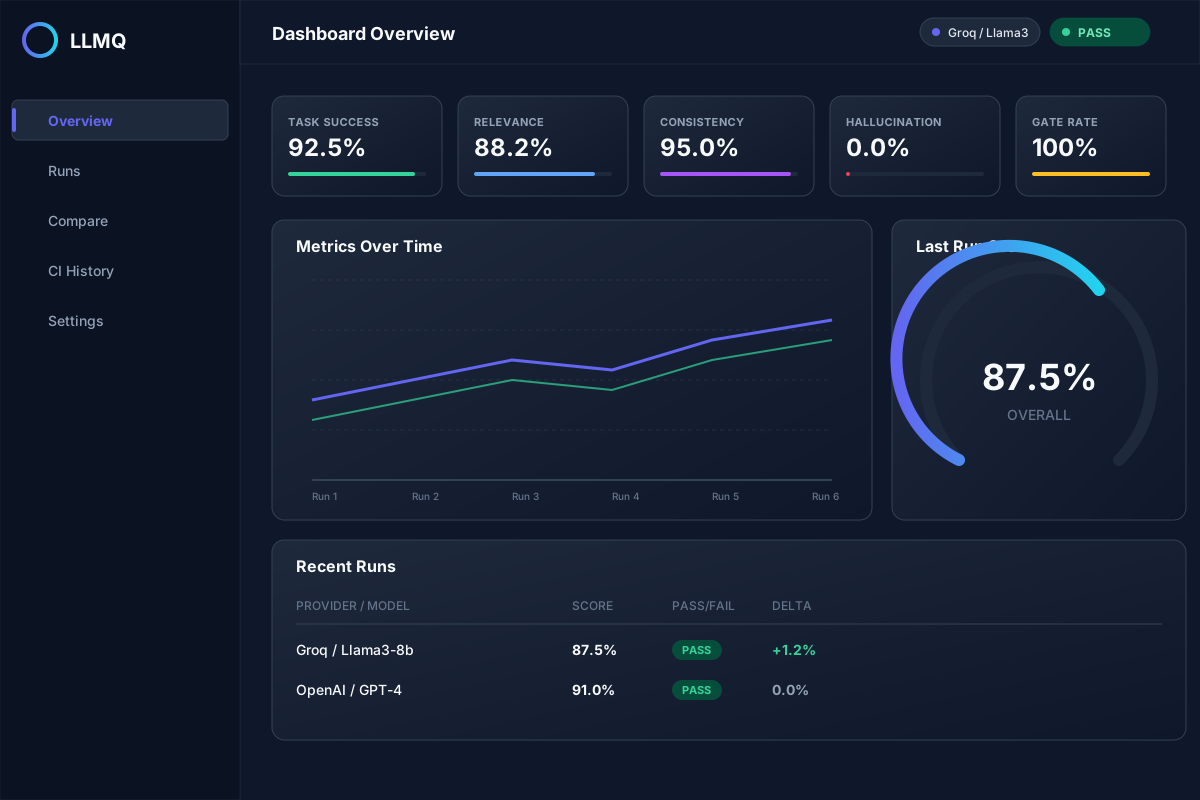
Run Summary View
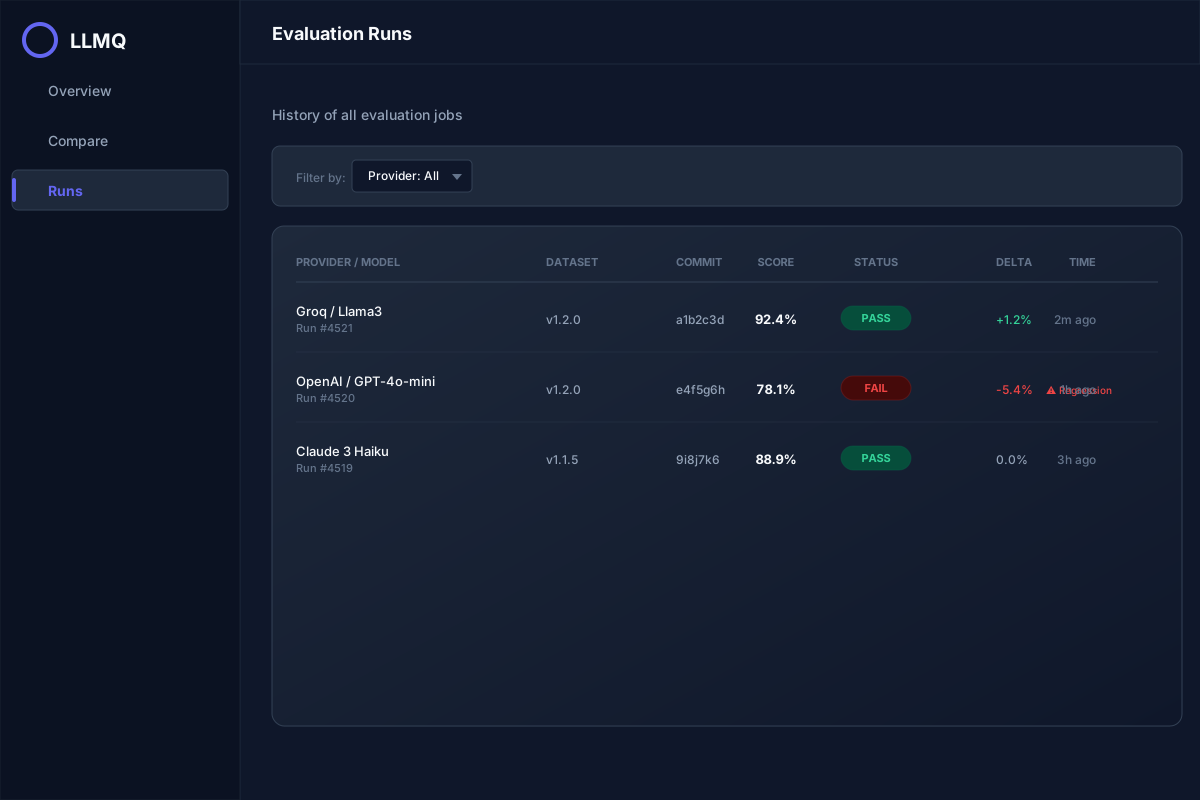
Historical Trends
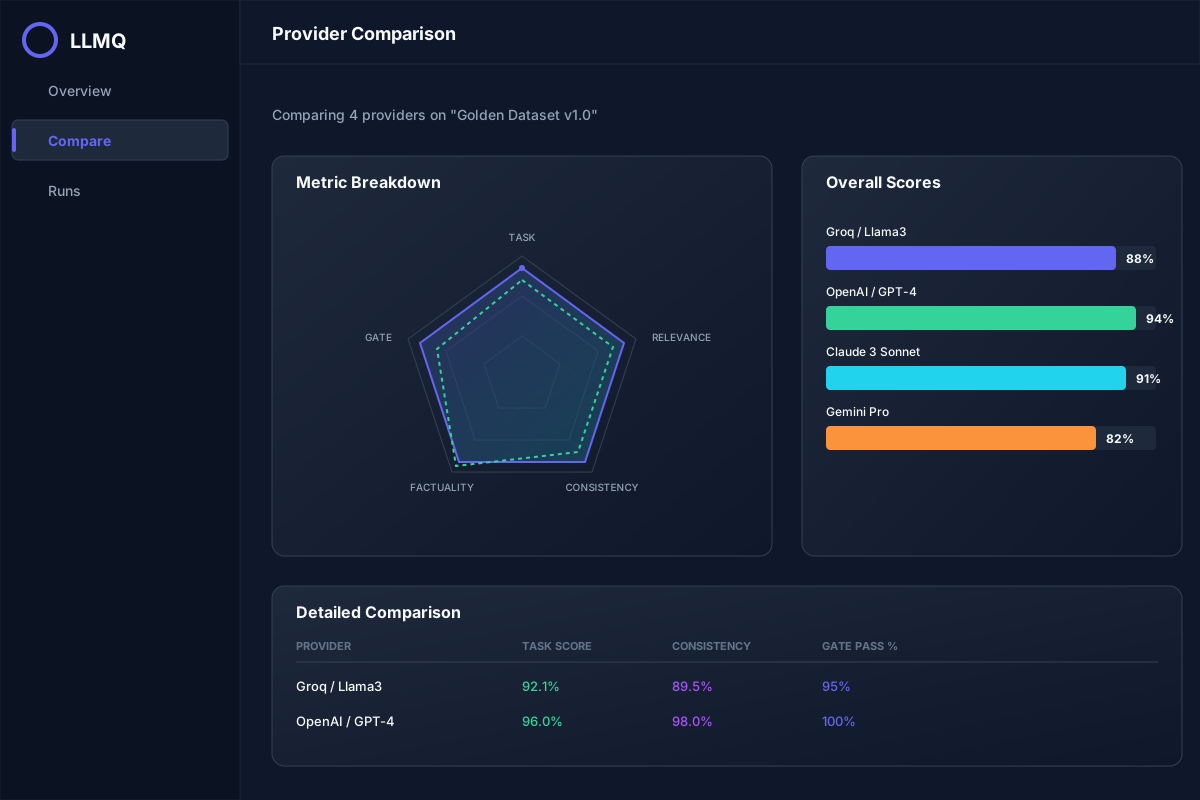
Multi-Model Comparison